
Pasarte de la consola al PC no requiere reemplazar todos los dispositivos que ya tienes. Un ordenador de sobremesa necesita una pantalla, un teclado y un ratón, mientras que tu mando, auriculares con micrófono o televisor actuales pueden seguir funcionando. Empieza por comprobar la compatibilidad, los puertos disponibles y el espacio del escritorio. Después, elige nuevos accesorios según los juegos a los que juegas y los controles que prefieres. Esta lista de comprobación separa lo esencial para el primer día de las actualizaciones que pueden esperar hasta que conozcas mejor tu nueva configuración.
¿Qué necesitas para jugar en PC desde el primer día?
Un portátil gaming ya incluye pantalla y teclado, aunque la mayoría de los juegos son más fáciles de controlar con un ratón externo. Un ordenador de sobremesa requiere más equipos por separado.
| Periférico | Prioridad | Qué comprobar |
|---|---|---|
| Monitor o televisor | Esencial para un ordenador de sobremesa | Resolución, frecuencia de actualización y compatibilidad con HDMI o DisplayPort |
| Teclado | Esencial | Distribución, ancho del escritorio y tipo de conexión |
| Ratón | Esencial | Forma, tamaño, peso y botones |
| Alfombrilla de ratón | Muy recomendable | Área de movimiento, velocidad de la superficie y estabilidad de la base |
| Auriculares con micrófono, auriculares o altavoces | Necesario para el audio | Compatibilidad con USB, 3,5 mm, Bluetooth o 2,4 GHz |
| Mando | Opcional | Compatibilidad con el juego, método de conexión y funciones compatibles |
| Micrófono independiente | Opcional | Solo es necesario si tu dispositivo de audio no tiene un micrófono adecuado |
| Brazo para monitor o reposamuñecas | Actualización posterior | Añádelo cuando la configuración revele un problema concreto de comodidad |
Antes de comprar nada, cuenta los puertos USB disponibles y comprueba si el PC es compatible con Bluetooth. Comprueba también qué cable de vídeo incluye el monitor.
¿Mantener el mando o cambiar al teclado y el ratón?
Pasarte al PC no significa renunciar a tu mando. Los juegos de carreras, plataformas, lucha, deportes y muchos juegos de acción en tercera persona siguen siendo cómodos con un gamepad. Los controles de teclado y ratón suelen ser más adecuados para shooters, juegos de estrategia y títulos con muchos comandos.
Por lo general, los mandos de Xbox funcionan con Windows mediante USB, Bluetooth o Xbox Wireless, según el mando y el hardware del PC. Un mando DualSense también puede conectarse a un PC con Windows mediante USB-C o Bluetooth. Sin embargo, la respuesta háptica, los gatillos adaptativos, el audio del mando y las indicaciones de botones dependen del juego y de la conexión.
Steam te permite filtrar los juegos por compatibilidad con mandos, incluidos los mandos de Xbox, DualShock y DualSense. Consulta la página de la tienda antes de dar por hecho que todas las funciones serán compatibles.
Muchos jugadores utilizan ambos métodos de entrada. Adapta los controles con mando o teclado y ratón a cada género en lugar de imponer una sola opción a toda tu biblioteca de juegos. Puedes mantener los controles habituales en los juegos de carreras mientras aprendes a usar el teclado y el ratón en los shooters.
Elige un teclado que se adapte a tu escritorio y a tus juegos
El tamaño del teclado determina cuántas teclas permanecen disponibles y cuánto espacio queda para el ratón. Un teclado ancho puede empujar el brazo del ratón hacia fuera, especialmente en un escritorio compacto.
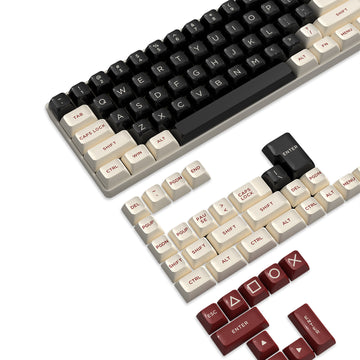
Para la mayoría de los nuevos jugadores de PC, las distribuciones del 75% y TKL ofrecen un punto de partida práctico:
- Un teclado del 75% conserva la fila de funciones y las teclas de flecha en una distribución compacta.
- Un teclado TKL elimina el teclado numérico, pero conserva la fila de funciones y el grupo de navegación.
- Un teclado de tamaño completo es adecuado para quienes necesitan habitualmente el teclado numérico para trabajar, usar simuladores o emplear atajos.
- Un teclado del 65% ahorra más espacio, pero traslada la fila de funciones y varios comandos a capas secundarias.
Revisa los juegos a los que juegas antes de elegir una distribución muy compacta. Los MMO, los juegos de estrategia, los simuladores y las aplicaciones con muchos atajos pueden beneficiarse de teclas adicionales.
¿Necesitas un teclado mecánico?
Un teclado mecánico es opcional. La sensación de los interruptores, la distribución, el rollover y la estabilidad de la conexión importan más que la categoría del teclado por sí sola.
Los interruptores lineales se mueven suavemente sin un bulto táctil y suelen ser adecuados para entradas repetidas. Los interruptores táctiles proporcionan una respuesta física alrededor del punto de activación. Los interruptores clicky añaden una respuesta sonora, pero pueden distraer en habitaciones compartidas o durante el chat de voz.
Las conexiones por cable y de 2,4 GHz son prácticas para un escritorio de juego dedicado. Bluetooth resulta cómodo para cambiar entre dispositivos, aunque la latencia y el comportamiento de la frecuencia de sondeo varían según el producto.

Elige el ratón y la alfombrilla como un solo conjunto
Prioriza la forma, el tamaño y la ubicación de los botones antes que los DPI máximos. El ratón debe adaptarse a tu agarre natural, mantener los botones laterales al alcance y permanecer seguro cuando lo levantes y lo vuelvas a centrar.
Las medidas de la mano ayudan a reducir las opciones, pero el estilo de agarre cambia la sensación de la misma carcasa. La altura de la carcasa, la posición de la joroba y los puntos de contacto determinan hasta qué punto un ratón es adecuado para el agarre de palma, de garra o de dedos. Un ratón largo y con la parte trasera alta puede ser adecuado para un agarre de palma, pero limitar a quien usa un agarre de dedos.
La preferencia de peso también depende del juego. Un ratón más ligero puede ser más fácil de recolocar en juegos de disparos. Un diseño más voluminoso o algo más pesado puede resultar más estable durante el uso general. Los botones laterales adicionales son más útiles en MMO, MOBA y juegos con habilidades frecuentes.
Empieza con 800 o 1600 DPI y ajusta después la sensibilidad dentro del juego. Estos valores ofrecen puntos de partida reproducibles, no objetivos universales. Si el ratón ofrece varias frecuencias de sondeo, empieza con 1000 Hz. Las frecuencias más altas requieren hardware adecuado y no mejoran automáticamente el control.
La alfombrilla debe ofrecer suficiente espacio para realizar un giro normal y las correcciones posteriores. Las alfombrillas de tela suelen proporcionar más fricción y control al detener el movimiento. Las superficies rígidas, incluido el vidrio, normalmente permiten un deslizamiento más rápido y hacen que el estado de los patines del ratón se note más. Al comparar alfombrillas de tela y rígidas, elige según la velocidad y la resistencia al detener el movimiento que prefieras.
Adapta el monitor al rendimiento de tu PC
Un monitor no puede mostrar por completo cada fotograma individual producido por encima de su frecuencia de actualización, aunque una mayor frecuencia de fotogramas aún puede reducir la latencia de entrada. Elige la pantalla en función de los juegos que juegas y del rendimiento que tu PC pueda mantener.
Una pantalla de 60 o 75 Hz sigue siendo adecuada para juegos más lentos y tareas informáticas generales. Un monitor de 120, 144 o 165 Hz puede ofrecer un movimiento más fluido en juegos de disparos, carreras y otros títulos de acción rápida. La resolución también afecta al rendimiento, por lo que un monitor de mayor resolución puede requerir más potencia gráfica para mantener la misma frecuencia de fotogramas.
Confirma que el cable y el puerto seleccionados admitan la resolución y la frecuencia de actualización previstas. En un ordenador de sobremesa con una tarjeta gráfica dedicada, normalmente el monitor debe conectarse a la tarjeta gráfica en lugar de a la salida de vídeo de la placa base.
Después de conectar la pantalla, abre Configuración > Sistema > Pantalla > Pantalla avanzada y selecciona una frecuencia de actualización compatible. De lo contrario, Windows podría dejar un monitor de alta frecuencia de actualización con una configuración predeterminada inferior.
Comprueba si tus auriculares actuales funcionarán
Los auriculares para consola pueden funcionar en PC, pero la compatibilidad depende de la conexión.
Unos auriculares USB necesitan compatibilidad de Windows con ese modelo. Unos auriculares de 3,5 mm pueden conectarse directamente cuando el PC tiene un conector combinado para auriculares. Los ordenadores con conectores independientes para auriculares y micrófono pueden requerir un divisor para un conector de auriculares de cuatro polos.
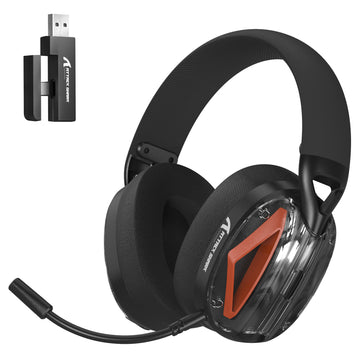
El audio Bluetooth requiere Bluetooth integrado o un adaptador. Unos auriculares inalámbricos específicos para consolas pueden depender de un transmisor propietario sin compatibilidad con PC. Comprueba el modelo de los auriculares y el transmisor en lugar de suponer que todos los dispositivos inalámbricos son multiplataforma.
Al comprar equipos de audio nuevos, ten en cuenta la estabilidad de la conexión, la claridad del micrófono, la presión de sujeción, el peso y la acumulación de calor. Unos auriculares gaming con micrófono pueden gestionar el audio del juego y el chat de voz sin ocupar espacio adicional en el escritorio.

Configura los periféricos antes de cambiar los ajustes avanzados
Completa la configuración básica antes de experimentar con la sensibilidad, el disparador rápido, el tiempo antirrebote, los ajustes del ecualizador o los perfiles de iluminación:
- Conecta el monitor a la salida gráfica correcta.
- Selecciona la resolución y la frecuencia de actualización deseadas en Windows.
- Ejecuta Windows Update e instala el controlador gráfico actual.
- Conecta el teclado, el ratón, el dispositivo de audio y el controlador.
- Instala únicamente las utilidades necesarias para tus modelos desde nuestra biblioteca de controladores y software.
- Establece un solo valor de DPI del ratón y ajusta la sensibilidad dentro de cada juego.
- Reasigna únicamente los comandos a los que resulte difícil acceder.
- Confirma que Windows y el juego utilizan la entrada y salida de audio correctas.
- Guarda un perfil funcional antes de probar configuraciones avanzadas.
Mantén la configuración estable durante varias sesiones. Cambiar a la vez los DPI, la alfombrilla del ratón, el agarre, las asignaciones de teclas y la posición del teclado dificulta identificar qué ha ayudado.
La posición del escritorio también afecta al control. Mantén el monitor centrado y coloca su parte superior aproximadamente a la altura de los ojos o ligeramente por debajo. Ajusta la silla para mantener los hombros relajados y evitar que las muñecas se doblen demasiado hacia arriba. Juega varias sesiones antes de comprar accesorios ergonómicos para identificar si la anchura del teclado, la altura del monitor o la posición de la silla está causando molestias.
Construye tu configuración para jugar en PC por etapas
Empieza con una pantalla adecuada, teclado, ratón, alfombrilla y solución de audio. Sigue usando tu mando en los juegos en los que te resulte cómodo.
Actualiza solo cuando un dispositivo suponga una limitación clara. Podría tratarse de un teclado que bloquee el movimiento del ratón, unos auriculares con un micrófono poco fiable o un monitor que no pueda mostrar la frecuencia de fotogramas que produce tu PC. Este enfoque da a cada compra una razón práctica y mantiene la configuración inicial centrada en la compatibilidad y la comodidad.
Preguntas frecuentes
P1. ¿Puedo usar un televisor en lugar de un monitor para juegos?
Sí. Conecta el PC mediante un puerto HDMI adecuado y activa el modo Juego del televisor cuando esté disponible. Comprueba la resolución compatible, la frecuencia de actualización y la latencia de entrada. Un televisor puede ser adecuado para jugar con mando, mientras que un monitor suele adaptarse mejor a un escritorio con teclado y ratón para usarlo de cerca.
P2. ¿Se transferirán a PC los datos guardados de mi consola?
Depende del juego. La progresión cruzada puede transferir partidas guardadas, personajes o contenido comprado mediante una cuenta del editor. Otros juegos mantienen el progreso de consola y PC por separado. Consulta la política de progresión cruzada del juego antes de comprar la versión para PC.
P3. ¿Por qué un juego muestra botones de Xbox con un mando de PlayStation?
Algunos juegos de PC muestran indicaciones con botones al estilo de Xbox aunque funcione un mando de PlayStation. Los iconos de botones nativos de PlayStation dependen del juego. Steam Input u otra traducción de controles también puede cambiar cómo se identifica el mando.
P4. ¿Cuántos puertos USB necesita una configuración básica para jugar en PC?
Una configuración básica suele necesitar de dos a cuatro puertos USB para el teclado, el ratón, los auriculares y el mando o cable de carga. Los receptores inalámbricos, las cámaras web, los micrófonos y otros accesorios pueden elevar la necesidad a cinco o seis. Deja un puerto accesible libre para actualizaciones o dispositivos temporales.
P5. ¿Pueden interferir entre sí los receptores inalámbricos para juegos?
Sí. Varios receptores de 2,4 GHz colocados muy cerca pueden sufrir interferencias, especialmente cerca de otros dispositivos inalámbricos o superficies metálicas. Separa los receptores cuando sea posible, usa puertos orientados hacia el frente o cables de extensión y evita ocultar todos los dongles directamente detrás de la carcasa del PC.