La mecánica de la retroalimentación sensorial en la entrada competitiva
En entornos de juego de alta presión, como arenas de batalla en línea multijugador (MOBA) y incursiones masivas multijugador en línea (MMO), la diferencia entre un comando y su ejecución se mide a menudo en milisegundos. Mientras que gran parte de la industria se enfoca en la velocidad bruta, los expertos en ingeniería de rendimiento técnico reconocen que la velocidad es secundaria a la "confirmación". La retroalimentación táctil y auditiva sirve como los principales bucles sensoriales que informan al jugador si una entrada mecánica ha superado con éxito el umbral de activación.
El fenómeno de la "cola de habilidades" —donde un jugador intenta activar una habilidad secundaria durante el tiempo de reutilización global (GCD)— a menudo resulta en acciones perdidas. Sin una confirmación física clara de la primera pulsación, los jugadores pueden desincronizar la segunda, lo que lleva a un fallo crítico en las rotaciones de habilidades. Diseñar el perfil táctil de un interruptor no es solo una elección estética; es un requisito funcional para reducir la carga cognitiva y mejorar la conciencia situacional durante escenarios de combate complejos.
Proporción táctil y confirmación de habilidad
La "sensación" de un interruptor de teclado se define por su curva fuerza-recorrido. Una métrica clave en este análisis es la Proporción Táctil, definida como la relación entre la fuerza máxima táctil y la fuerza de activación. Según la documentación técnica de Snaptron, esta proporción determina cuán distintivo se siente un "tope" para el usuario.
Para jugadores de MOBA, una alta proporción táctil proporciona un "clic" o "tope" físico definitivo que señala el momento exacto en que el sistema registra una habilidad. Esta confirmación física permite que el cerebro comience inmediatamente la cuenta regresiva interna para el siguiente comando, en lugar de depender únicamente de señales visuales de la interfaz en pantalla.
Perfiles comparativos de interruptores para juego competitivo
| Tipo de interruptor | Característica táctil | Beneficio en el juego | Fuerza típica de activación |
|---|---|---|---|
| Lineal | Suave, sin tope | Entradas de disparo rápido, doble pulsación | 45g - 50g |
| Táctil | Tope pronunciado | Confirmación de habilidad, reducción de errores de pulsación | 50g - 60g |
| Clic | Tope + clic auditivo | Rotaciones rítmicas, ritmo no visual | 50g - 60g |
| Magnético (HE) | Ajustable, suave | Reinicio casi instantáneo, precisión extrema | Variable (0,1 mm - 4,0 mm) |
Nota metodológica: Esta comparación se basa en el modelado determinista de la curva fuerza-recorrido. La columna "Beneficio" representa un escenario modelo donde la restricción principal es reducir los errores de "acción perdida" durante un juego de más de 150 acciones por minuto (APM).
Tecnología de efecto Hall y reinicio rápido del disparador
La introducción de sensores de efecto Hall (HE) ha alterado fundamentalmente el panorama del rendimiento. A diferencia de los interruptores mecánicos tradicionales que dependen de puntos de contacto físicos, los interruptores HE utilizan la fuerza de Lorentz para medir la proximidad de un imán a un sensor. Esto permite puntos de actuación ajustables y, lo que es más importante, una función conocida como Rapid Trigger.
En interruptores tradicionales, la tecla debe volver a pasar un "punto de reinicio" fijo antes de poder presionarse de nuevo. En escenarios de alta APM, este tiempo de recorrido crea un cuello de botella a nivel de hardware. Los interruptores magnéticos permiten una distancia de reinicio tan baja como 0.1 mm (según los benchmarks de rendimiento Rapid Trigger).
Para un jugador de MOBA, configurar una actuación de 0.2 mm con un reinicio de 0.1 mm crea un ciclo de retroalimentación casi instantáneo. El recorrido mínimo requerido para reiniciar la tecla permite un "buffering" de comandos con precisión de fotogramas. Esto es especialmente efectivo para habilidades de "recast", donde la velocidad de la segunda pulsación determina el éxito del combo.
Estrategia de optimización: El umbral de 0.1 mm
- Problema: Los puntos de reinicio mecánicos estándar (normalmente de 1.0 mm a 1.5 mm) causan retraso en el "spam" de habilidades.
- Solución: Calibrar los interruptores HE a un reinicio de 0.1 mm. Esto minimiza la distancia física que el dedo debe recorrer para reactivar el sensor.
- Heurística: Una base práctica para el juego competitivo de MOBA es un punto de actuación de 1.0 mm para habilidades principales y un reinicio de 0.1 mm para todas las teclas para maximizar la capacidad de respuesta.
Ritmo acústico: El metrónomo auditivo
Mientras que la retroalimentación táctil aborda el sentido del tacto, la retroalimentación auditiva —el "clic" de un interruptor— aborda el sentido del oído. Para jugadores de MMO que gestionan rotaciones que involucran 12 o más asignaciones de teclas distintas, el sonido del interruptor funciona como un metrónomo no visual.
Estudios técnicos sobre el Impacto de los tipos de interruptores mecánicos en el rendimiento de la escritura y la experiencia del usuario sugieren que, aunque los interruptores clicky tienen un perfil sonoro más alto, proporcionan un mayor nivel de confirmación para el usuario. En un entorno de incursión donde la pantalla está saturada con efectos de partículas y alertas de la interfaz, el "clic" auditivo de una tecla de rotación principal ofrece una capa secundaria de confirmación de que la habilidad se ha activado.
Implementación práctica: Una heurística común entre expertos es el "Diseño Híbrido". Los jugadores suelen usar interruptores clicky para habilidades rotacionales principales (normalmente asignadas a las teclas 1 a 5) para mantener un ritmo constante. Por otro lado, pueden usar interruptores táctiles o lineales más silenciosos para tiempos de reutilización situacionales o teclas de movimiento (WASD) para evitar la fatiga auditiva y reducir el ruido en entornos compartidos.
La Capa de Interfaz: Keycaps PBT y Estabilidad de la Fricción
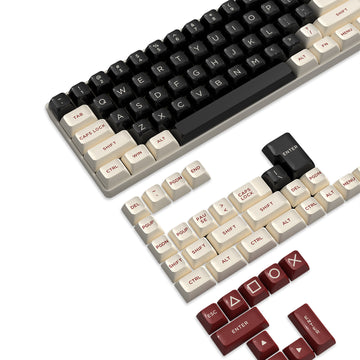
La interacción entre la punta del dedo y la superficie del keycap es una variable a menudo pasada por alto en la ingeniería táctil. Los keycaps estándar de ABS (Acrilonitrilo Butadieno Estireno) son propensos a "brillar", un proceso donde el plástico se desgasta y se vuelve liso con el tiempo.
En sesiones de juego prolongadas, el sudor y los aceites pueden hacer que las superficies ABS sean resbaladizas. Esto aumenta sutilmente la fuerza requerida para mantener el agarre, lo que puede alterar el perfil táctil percibido del interruptor. Los keycaps mate de PBT (Polibutileno Tereftalato) ofrecen una mayor resistencia al desgaste y una superficie naturalmente texturizada. Esta fricción constante asegura que la fuerza de activación prevista se experimente de manera fiable, lo cual es crítico para mantener la precisión durante una serie de torneos o raids de varias horas.
Comparación de Materiales de Keycaps (Enfoque en Rendimiento)
- PBT (Polibutileno Tereftalato): Mayor densidad, textura mate, alta resistencia a aceites. Mantiene el "agarre" durante escenarios de alta sudoración.
- ABS (Acrilonitrilo Butadieno Estireno): Menor densidad, propenso a "brillar" suavemente, se vuelve resbaladizo con la humedad.
- Heurística PBT: Para juego competitivo, se recomiendan keycaps PBT con un grosor de 1.3mm a 1.5mm para proporcionar un perfil acústico más profundo y una plataforma táctil más estable.
Sondeo a 8000Hz: Reducción del jitter de entrada
La base técnica de estas confirmaciones táctiles es la velocidad de comunicación entre el teclado y el PC. Los teclados gaming estándar operan a una tasa de sondeo de 1000Hz (intervalo de 1.0ms). Sin embargo, el hardware de rendimiento élite se está moviendo hacia una tasa de sondeo de 8000Hz (8K), que reduce el intervalo a 0.125ms.
Según el Libro Blanco de la Industria Global de Periféricos para Juegos (2026), las altas tasas de sondeo reducen significativamente el "jitter de entrada", la variación en el tiempo que tarda una pulsación en ser registrada por el sistema operativo. A 8000Hz, el sistema captura el momento exacto de activación con 8 veces la precisión del hardware estándar.
Restricciones técnicas del sondeo 8K
- Carga de la CPU: Procesar 8,000 interrupciones por segundo (IRQ) impone una carga pesada en un solo núcleo de la CPU. Esto requiere un procesador moderno y de alto rendimiento para evitar tartamudeos en el sistema.
- Topología USB: Los dispositivos deben conectarse directamente a los puertos I/O traseros de la placa base. Usar concentradores USB o conectores del panel frontal puede provocar pérdida de paquetes y degradación de la señal debido al ancho de banda compartido y al aislamiento insuficiente.
- Latencia de Sincronización de Movimiento: Mientras que algunos dispositivos de 1000Hz añaden ~0.5ms de latencia para la sincronización de movimiento, a 8000Hz, el retraso determinista se reduce a ~0.0625ms, haciéndolo prácticamente insignificante para la percepción humana.
Modelando la Eficiencia Táctil: Un Análisis de Escenario
Para demostrar el impacto de estas tecnologías, modelamos un escenario hipotético de "Secuencia de Habilidades" que involucra un combo rápido de 3 teclas en un entorno MOBA.
Nota de Modelado (Análisis de Escenario): Este modelo asume un usuario con habilidad mecánica de alto nivel (APM > 180) y un sistema sin cuellos de botella externos.
| Parámetro | Valor | Justificación | | :--- | :--- | :--- | | Frecuencia de Entrada | 3 teclas / 200ms | Velocidad estándar de combo de alto nivel | | Distancia de Reinicio del Interruptor | 0.1mm (HE) vs 1.2mm (Mecánico) | Comparando Magnético vs Tradicional | | Tasa de Sondeo | 8000Hz | Reducción de la variación en la captura | | Coeficiente de Fricción de la Tecla | 0.45 (PBT) | Estimación de agarre en superficie mate | | Prioridad IRQ de CPU | Alta | Asegurando la estabilidad del paquete 8K |
Resultados del análisis: En el modelo HE de 0.1mm, el recorrido físico total requerido para completar la secuencia de 3 teclas se redujo aproximadamente un 65% en comparación con el modelo mecánico tradicional. Esta reducción en el recorrido, junto con el intervalo de sondeo de 0.125ms, resulta en una "ventana de ejecución" significativamente más ajustada, reduciendo la probabilidad de que una habilidad se pierda debido al Enfriamiento Global.
Integración del Sistema y Protocolos USB HID
La fiabilidad de la retroalimentación táctil también depende de la capa de software. La mayoría de los teclados para juegos utilizan la Definición de Clase USB HID (Dispositivo de Interfaz Humana). Según la Especificación USB-IF HID 1.11, el descriptor de informe determina cómo el sistema operativo interpreta los estados de las teclas.
El firmware avanzado, como el que se encuentra en controladores de alto rendimiento, a menudo utiliza descriptores de informe personalizados para evitar los algoritmos estándar de rebote de Windows. Esto permite que el evento táctil bruto (la activación) se envíe al motor del juego con un retraso mínimo de procesamiento. Para los jugadores que usan técnicas de optimización de jitter de entrada, asegurarse de que el firmware esté actualizado a la última versión es esencial para mantener la integridad del flujo de sondeo a 8K.
Construyendo la Configuración Táctica Definitiva
Diseñar una configuración para la confirmación de habilidades requiere un enfoque holístico que equilibre la mecánica de los interruptores, la ciencia de materiales y los protocolos del sistema.
- Seleccionar la Base: Priorice interruptores Hall Effect por su activación ajustable y capacidades de reinicio de 0.1mm.
- Optimizar la Interfaz: Use keycaps de PBT para asegurar una fricción consistente y claridad táctil durante sesiones largas.
- Calibrar para el Género: En MOBAs, establezca una activación baja (1.0mm) para habilidades principales. En MMOs, considere interruptores clicky para rotaciones principales para proporcionar un ritmo auditivo.
- Maximizar la Velocidad del Sistema: Utilice sondeo a 8000Hz y asegúrese de que el dispositivo esté conectado directamente a un puerto USB de la placa base para minimizar la fluctuación de IRQ.
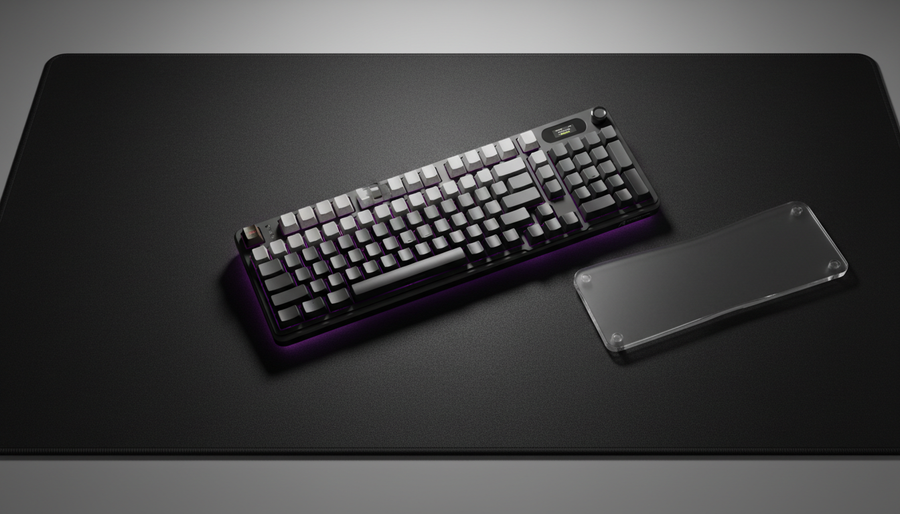
- Gestionar la Ergonomía: Use un reposamuñecas de alta calidad para mantener la alineación natural de la muñeca, lo que asegura que los dedos golpeen las teclas en el ángulo óptimo para la percepción táctil.
Confianza y Seguridad: Cumplimiento de Periféricos
Al seleccionar hardware de alto rendimiento, asegúrese de que el dispositivo cumpla con las normas internacionales de seguridad y inalámbricas. El hardware confiable debe contar con certificaciones como FCC ID (EE.UU.), ISED (Canadá) y CE/RED (Europa). Estas certificaciones verifican que los componentes inalámbricos y las baterías de ion de litio del dispositivo cumplen con rigurosos requisitos de seguridad y compatibilidad electromagnética (EMC). Para más información sobre la seguridad de las baterías de litio durante el transporte, consulte el Documento de Guía IATA 2025.
Resumen de heurísticas técnicas
- La Regla del 60%: Para la mayoría de los jugadores competitivos, una proporción táctil de aproximadamente 60% (fuerza máxima vs. fuerza de activación) proporciona el equilibrio óptimo entre confirmación y velocidad.
- Reinicio de Proximidad: Siempre establezca el punto de reinicio lo más cerca posible del punto de activación que permita el firmware (idealmente 0.1mm) para facilitar un recasteo rápido.
- E/S Directa: Nunca use un concentrador USB para periféricos de 8000Hz; la sobrecarga de IRQ y el potencial de colisiones de paquetes anularán los beneficios de rendimiento.
Al centrarse en la ingeniería de la retroalimentación táctil, los jugadores pueden ir más allá de "presionar teclas sin control" y avanzar hacia un estilo de juego más deliberado, rítmico y preciso. El hardware no es solo una herramienta de entrada; es una extensión sensorial de la intención del jugador.
Este artículo es solo para fines informativos y no constituye asesoramiento técnico o médico profesional. Para preocupaciones ergonómicas o lesiones por esfuerzo repetitivo preexistentes, consulte a un profesional de la salud calificado o a un especialista en ergonomía.